


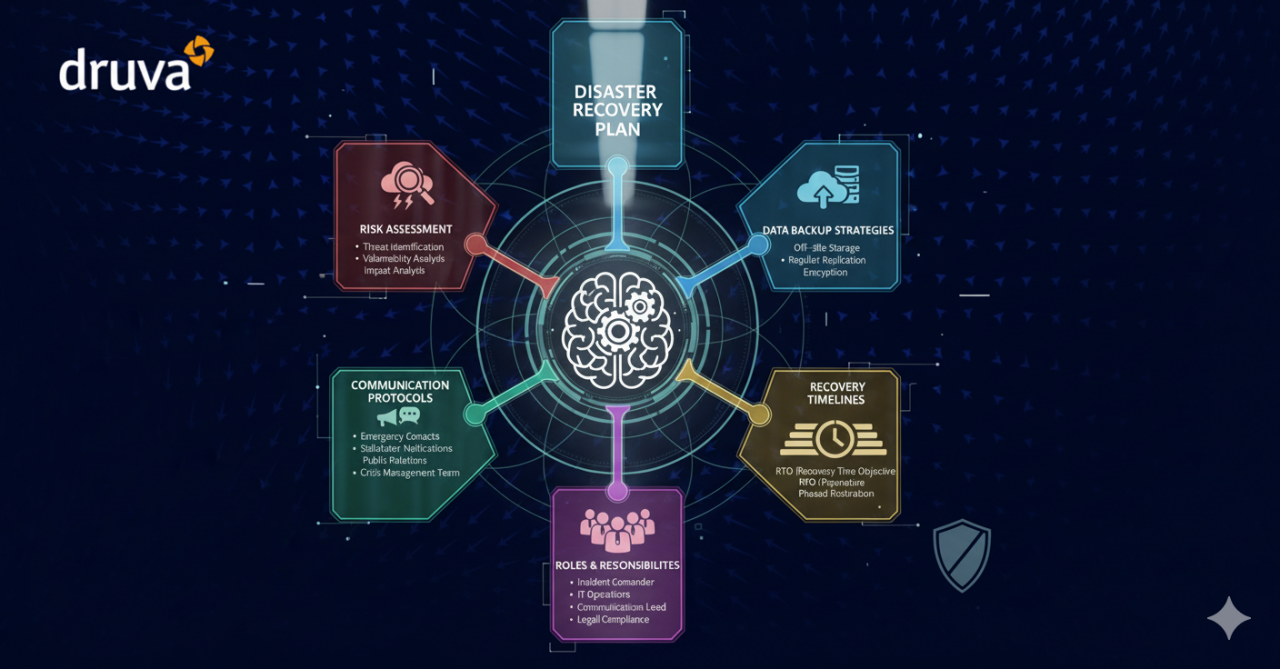
Disaster Recovery Plan

Disaster recovery plan explained

What’s a disaster recovery plan? Think of it as your organization’s ultimate safety net. A DRP (Disaster Recovery Plan) is a step-by-step guide designed to help your business bounce back from the unexpected—whether it’s a natural disaster, a cyberattack, or unexpected equipment failure. It’s all about protecting your IT infrastructure and ensuring a smooth recovery.

A good DRP lays out exactly what needs to happen before, during, and after a crisis, so your team knows how to act fast. Whether it’s dealing with intentional threats like hacking or accidental issues like system breakdowns, a disaster recovery plan keeps your business ready to face whatever comes its way.

Create your Disaster Recovery plan with Druva! Watch the demo video below to see it in action.

What is a disaster recovery plan?

Organizations generate massive amounts of mission-critical data every day, but what happens when disaster strikes? Human error, hardware failure, malware, or hacking can wreak havoc—leading to data loss that could cripple your business. That’s why having a solid disaster recovery plan is non-negotiable.

The best approach? Pair your IT disaster recovery plan with a rock-solid business continuity plan (BCP). A BCP is your organization’s ultimate safety net, built on five key components to keep you up and running no matter what.

1. Business resumption plan
2. Occupant emergency plan
3. Continuity of operations plan
4. Incident management plan (IMP)
5. Disaster recovery plan

Components one through three barely touch IT infrastructure—but when disaster strikes, IT takes center stage. While the incident management plan focuses on handling cyberattacks in normal times, it’s the disaster recovery plan (DRP) that truly matters for IT during a crisis.

The first step? A solid business impact analysis to set IT priorities and recovery time objectives. From there, it’s all about crafting strategies to restore applications, hardware, and data fast enough to keep the business moving.

Every disaster is different, and there’s no one-size-fits-all approach to a DRP. But no matter the situation, three core goals drive every effective disaster recovery plan: protect, recover, and rebuild. Let’s dive in!

  • Prevention, including proper backups, generators, and surge protectors
  • Detection of new potential threats, a natural byproduct of routine inspections
  • Correction, which might include holding a “lessons learned” brainstorming session and securing proper insurance policies

What should a
disaster recovery
plan
include?

Disaster Recovery Plan

Although disaster recovery strategies can vary widely, a modern disaster recovery plan (DRP) should include the following up-to-date components:

Goals

 Clearly defined goals remain fundamental, outlining what the organization aims to achieve during and after a disaster. These include the Recovery Time Objective (RTO) and the Recovery Point Objective (RPO). The RPO defines the maximum acceptable amount of data loss, often determining the frequency of backups. For instance, an RPO of 15 minutes means backups must occur at least every 15 minutes. The RTO, on the other hand, specifies how quickly systems and processes need to be restored after an outage. For example, an RTO of 2 hours ensures operations resume within that time to minimize disruption.

Personnel

 The DRP must identify all personnel responsible for executing the plan, including alternates for critical roles. Include clear roles, responsibilities, and contact details for each team member. Additionally, ensure team members are trained on DRP procedures and have access to necessary credentials, ensuring seamless execution even if key individuals are unavailable.

IT Inventory

 A current IT inventory is essential, detailing all hardware, software, and cloud-based services critical to the organization's operations. The inventory should indicate whether assets are business-critical, their ownership status (owned, leased, or as-a-service), and dependencies between systems. Modern tools like automated inventory platforms can ensure this information is always accurate and up-to-date.

Backup and Replication Procedures

 Today’s DRPs must outline robust data backup and replication strategies. This includes specifying storage locations (on-premises or cloud), backup schedules, and recovery processes. Cloud-based solutions like Disaster Recovery as a Service (DRaaS) have become increasingly popular for their scalability, cost-efficiency, and speed, allowing continuous data replication to remote servers for near-instant recovery.

Disaster Recovery Procedures

 Disaster recovery procedures should define proactive and reactive measures, including last-minute backups, mitigation strategies, containment of cybersecurity threats, and damage control. The focus should be on minimizing data loss and downtime while ensuring the safety and security of organizational assets. Incident response for modern threats like ransomware attacks should also be included.

Disaster Recovery Sites

 A strong DRP designates one or more disaster recovery sites. These often include a hot site (fully operational with real-time data replication) or a warm site (partially set up with key infrastructure and data backups). Organizations leveraging hybrid cloud environments often utilize cloud-based recovery sites for rapid scalability and reduced costs. These sites should be tested regularly for failover readiness.

Restoration Procedures

 Restoration steps should provide a structured approach to returning all systems to operational status. This includes recovery from specific scenarios like ransomware attacks, natural disasters, or prolonged power outages. The plan should include defined priorities, such as restoring mission-critical systems first, followed by secondary systems.

Vendor and Cloud Services Coordination

 If the organization uses third-party cloud or disaster recovery services, the DRP should include vendor contact details, service level agreements (SLAs), and a list of authorized employees who can interact with the vendor during a disaster. Establish a clear line of communication between the vendor and internal teams for rapid support.


Media and Communication Plan

In today’s hyperconnected world, a disaster recovery plan should include a public communication strategy. Designate a spokesperson or public relations contact who can manage media inquiries, customer updates, and stakeholder communication. This is especially important for high-impact organizations like healthcare providers, financial institutions, and government agencies.

Testing and Maintenance

 Modern DRPs emphasize regular testing through simulations, tabletop exercises, or live failover drills. These tests ensure the plan is effective, team members are prepared, and systems can be restored within the defined RTO and RPO. Continuous updates to the DRP are crucial as new assets, risks, or technologies are introduced.

Compliance and Security

 Ensure the disaster recovery plan aligns with current regulatory standards, such as GDPR, HIPAA, or ISO 27001, depending on your industry. Modern DRPs must also include measures to secure backups and recovery systems, such as encryption, multi-factor authentication, and secure access controls, to protect against emerging cyber threats.

By incorporating these updated practices, organizations can build a resilient disaster recovery plan that not only restores operations quickly but also aligns with today’s security, compliance, and technological advancements.

Benefits of a
disaster recovery
plan

Obviously, a disaster recovery plan details scenarios for reducing interruptions and resuming operations rapidly in the aftermath of a disaster. It is a central piece of the business continuity plan and should be designed to prevent data loss and enable sufficient IT recovery.

Beyond the clear benefit of improved business continuity under any circumstances, having a company disaster recovery plan can help an organization in several other important ways.

Cost-efficiency
Disaster recovery plans include various steps and components that improve cost-efficiency. The most important elements include prevention, detection, and correction, as discussed above. Preventative measures reduce the risks from man-made disasters. Detection measures are designed to quickly identify problems when they do happen, and corrective measures restore lost data and enable a rapid resumption of operations.

Achieving cost-efficiency goals demands regular maintenance of IT systems in their optimal condition, high-level analysis of potential threats, and implementation of innovative cybersecurity solutions. Keeping software updated and systems optimally maintained saves time and is more cost-effective. Adopting cloud-based data management as a part of disaster recovery planning can further reduce the costs of backups and maintenance.

Increased productivity
Designating specific roles and responsibilities along with accountability as a disaster recovery plan demands increases effectiveness and productivity in your team. It also ensures redundancies in personnel for key tasks, improving sick day productivity, and reducing the costs of turnover.

Improved customer retention
Customers do not easily forgive failures or downtime, especially if they result in loss of sensitive data. Disaster recovery planning helps organizations meet and maintain a higher quality of service in every situation. Reducing the risks your customers face from data loss and downtime ensures they receive better service from you during and after a disaster, shoring up their loyalty.

Compliance
Enterprise business users, financial markets, healthcare patients, and government entities, all rely on availability, uptime, and the disaster recovery plans of important organizations. These organizations in turn rely on their DRPs to stay compliant with industry regulations such as HIPAA and FINRA.

Scalability
Planning disaster recovery allows businesses to identify innovative solutions to reduce the costs of archive maintenance, backups, and recovery. Cloud-based data storage and related technologies enhance and simplify the process and add flexibility and scalability.

Disaster recovery strategies can reduce the risk of human error, eliminate superfluous hardware, and streamline the entire IT process. In this way, the planning process itself becomes one of the advantages of disaster recovery planning, streamlining the business, and rendering it more profitable and resilient before anything ever goes wrong.


Ways to develop a disaster recovery
plan

There are several steps in the development of a disaster recovery plan. Although these may vary somewhat based on the organization, here are the basic disaster recovery plan steps:

Risk assessment
First, perform a risk assessment and business impact analysis (BIA) that addresses many potential disasters. Analyze each functional area of the organization to determine possible consequences from middle of the road scenarios to “worst-case” situations, such as total loss of the main building. Robust disaster recovery plans set goals by evaluating risks up front, as part of the larger business continuity plan, to allow critical business operations to continue for customers and users as IT addresses the event and its fallout.

Consider infrastructure and geographical risk factors in your risk analysis. For example, the ability of employees to access the data center in case of a natural disaster, whether or not you use cloud backup, and whether you have a single site or multiple sites are all relevant here. Be sure to include this information, even if you’re working from a sample disaster recovery plan.

Evaluate critical needs
Next, establish priorities for operations and processing by evaluating the critical needs of each department. Prepare written agreements for selected alternatives, and include details specifying all special security procedures, availability, cost, duration, guarantee of compatibility, hours of operation, what constitutes an emergency, non-mainframe resource requirements, system testing, termination conditions, a procedure notifying users of system changes, personnel requirements, specs on required processing hardware and other equipment, a service extension negotiation process, and other contractual issues.

Set disaster recovery plan objectives
Create a list of mission-critical operations to plan for business continuity, and then determine which data, applications, equipment, or user accesses are necessary to support those functions. Based on the cost of downtime, determine each function’s recovery time objective (RTO). This is the target amount of time in hours, minutes, or seconds an operation or application can be offline without an unacceptable business impact.

Determine the recovery point objective (RPO), or the point in time back to which you must recover the application. This is essentially the amount of data the organization can afford to lose.

Assess any service level agreements (SLAs) that your organization has promised to users, executives, or other stakeholders.

Collect data and create the written document
Collect data for your plan using pre-formatted forms as needed. Data to collect in this stage may include:

  • lists (critical contact information list, backup employee position listing, master vendor list, master call list, notification checklist)
  • inventories (communications equipment, data center computer hardware, documentation, forms, insurance policies, microcomputer hardware and software, office equipment, off-site storage location equipment, workgroup hardware, etc.)
  • schedules for software and data files backup/retention
  • procedures for system restore/recovery
  • temporary disaster recovery locations
  • other documentation, inventories, lists, and materials

Organize and use the collected data in your written, documented plan.

Test and revise
Next, develop criteria and procedures for testing the plan. This is essential to ensure the organization has adopted compatible, feasible backup procedures and facilities, and to identify areas that should be modified. It also allows the team to be trained, and proves the value of the DRP and ability of the organization to withstand disasters.

Finally, test the plan based on the criteria and procedures. Conduct an initial dry run or structured walk-through test and correct any problems, ideally outside normal operational hours. Types of business disaster recovery plan tests include: disaster recovery plan checklist tests, full interruption tests, parallel tests, and simulation tests.


RPO vs RTO

The recovery point objective, or RPO, refers to how much data (in terms of the most recent changes) the company is willing to lose after a disaster occurs. For example, an RPO might be to lose no more than one hour of data, which means data backups must occur at least every hour to meet this objective.

The RPO answers this question: “How much data could be lost without significantly impacting the business?”

Example: If the RPO for a business is 20 hours and the last available good copy of data after an outage is 18 hours old, we are still within the RPO’s parameters.

Recovery time objective or RTO refers to the acceptable downtime after an outage before business processes and systems must be restored to operation. For example, the business must be able to return to operations within 4 hours in order to avoid unacceptable impacts to business continuity.

In other words, the RTO answers the question: “How much time after notification of business process disruption should it take to recover?”

To compare RPO and RTO, consider that RPO means a variable amount of data that would need to be re-entered after a loss or would be lost altogether during network downtime. In contrast, RTO refers to how much real time can elapse before the disruption unacceptably impedes normal business operations.

It is important to expose the gap between actuals and objectives set forth in the disaster recovery plan. Only business disruption and disaster rehearsals can expose actuals—specifically Recovery Point Actual (RPA) and Recovery Time Actual (RTA). Refining these differences brings the plan up to speed.


Strategies and tools for a disaster recovery plan

The right strategies and tools help implement a disaster recovery plan.

Traditional on-premises recovery strategies
The IT team should develop disaster recovery strategies for IT applications, systems, and data. This includes desktops, data, networks, connectivity, servers, wireless devices, and laptops. Identify IT resources that support time-sensitive business processes and functions so their recovery times match.

Information technology systems require connectivity, data, hardware, and software. The entire system may fail due to a single component, so recovery strategies should anticipate the loss of one or more of these system components:

  • Secure, climate-controlled computer room environment with backup power supply
  • Connectivity to a service provider
  • Hardware such as desktop and laptop computers, networks, wireless devices and peripherals, and servers
  • Software applications such as electronic mail, electronic data interchange, enterprise resource management, and office productivity

Data and restoration
For business applications that cannot tolerate downtime, actual parallel computing, data mirroring, or multiple data center synchronization is possible yet costly. Other solutions for mission critical business applications and sensitive data include cloud backup and cloud-native disaster recovery, which reduce the need for expensive hardware and IT infrastructure.

Internal recovery strategies
Some enterprises store data at multiple facilities and configure hardware to run similar applications from data center to data center when needed. Assuming off-site data backup or data mirroring are taking place, processing can continue and data can be restored at an alternate site under these circumstances. However, this is a costly solution, and one that demands an internal solution that is itself infallible.

Cloud-based disaster recovery strategies
Cloud-based vendors offer Disaster recovery as a service (DRaaS), which are essentially “hot sites” for IT disaster recovery hosted in the cloud. DRaaS leverages the cloud to provide fully configured recovery sites that mirror the applications in the local data center. This allows users a more immediate response, allowing them the ability to recover critical applications in the cloud, keeping them ready for use at the time of a disaster.

Vendors can host and manage applications, data security services, and data streams, enabling access to information via web browser at the primary business site or other sites. These vendors can typically enhance cybersecurity because their ongoing monitoring for outages offers data filtering and detection of malware threats. If the vendor detects an outage at the client site, they hold all client data automatically until the system is restored. In this sense, the cloud is essential to security planning and disaster recovery.


One-Click Recovery: Druva’s Cloud-Native Disaster Solution

Druva’s 100% SaaS, cloud-native data security platform provides a comprehensive disaster recovery solution. It backs up workloads from on-premises or cloud environments directly to the Druva Cloud Platform, built on AWS. This simplifies recovery with automated runbook execution and one-click disaster recovery. Druva’s cloud-native disaster recovery offers failover and failback capabilities, either to on-premises systems or to any AWS region or account, eliminating the need for hardware, a managed DR site, or extensive administration.

Discover Druva's innovative one-click solutions for both on-premises and cloud workloads.

FAQs Related to Disaster Recovery Plan

What is a disaster recovery plan (DRP) and why do we need one?
A disaster recovery plan is a documented set of procedures and policies that describe how an organization will restore IT systems, data, and operations after a disruptive event (natural disaster, cyberattack, hardware failure, human error). You need one to minimize downtime, reduce financial and reputational losses, meet legal or regulatory requirements, and ensure critical services return quickly and predictably.

What are the critical components of an effective disaster recovery plan?

  • Business impact analysis (BIA) to identify critical systems and acceptable downtime
  • Recovery Time Objective (RTO) and Recovery Point Objective (RPO) for each system/data set
  • Inventory of hardware, software, data, and key personnel with roles and contact information
  • Recovery procedures (step-by-step) and fallback options (e.g., alternate sites, cloud failover)
  • Backup strategy and verification processes
  • Communication plan (internal and external) and escalation matrix
  • Testing, maintenance, and version control processes

How often should we test the disaster recovery plan, and what types of tests are recommended?
Test at least annually; higher-risk or rapidly changing environments should test more frequently (quarterly or after major changes). Recommended test types:

  • Tabletop exercises (walkthroughs of procedures)
  • Partial technical tests (restore a subset of systems or data)
  • Full failover tests (simulate complete switch to DR environment)
  • Failback tests (return to primary environment)
    After every test, document findings, fix gaps, and update the plan.

What backup strategy should we use to meet RTO and RPO requirements?
Choose backups based on RTO/RPO: for near-zero RTO/RPO use synchronous replication or active-active clustering; for short RPOs use frequent snapshots or asynchronous replication; for longer RPOs use daily incremental/differential backups. Ensure:

  • Offsite or immutable backups (to mitigate ransomware)
  • Encryption in transit and at rest
  • Regular restore verification
  • Retention lifecycle aligned with compliance and business needs

Who should be involved in the disaster recovery process and how do we ensure roles are clear during an incident?
Involve IT operations, security, application owners, business/unit leaders, facilities, legal/compliance, communications/PR, and executive sponsors. To ensure clarity:

  • Define and document roles & responsibilities in the plan
  • Create an incident command structure (incident commander, technical leads, communications lead)
  • Maintain an up-to-date contact roster with backups for key roles
  • Train stakeholders on their responsibilities and run periodic drills that exercise decision-making and communication paths

Related Terms

Now that you’ve learned about disaster recovery plan examples, strategies, and steps, brush up on these related terms with Druva’s glossary: