Introducing the New Druva for Salesforce: Simpler Protection. Greater Visibility. Faster Recovery.

Parag Dharmadhikari, Senior Product Marketing Manager

November 12, 2026

Introducing the New Druva for Salesforce: Simpler Protection. Greater Visibility. Faster Recovery.

Content

    Key Takeaways

    • Independent, Air-Gapped Protection: Druva provides fully managed SaaS data protection for Salesforce with an independent copy stored completely outside Salesforce to safeguard against ransomware, bad integrations, and compromised credentials.
    • Native Lightning Experience & Organization Hub: The solution runs natively within Salesforce Lightning and features an Organization Hub that aggregates production environments and multiple sandboxes into a single view.
    • Intelligent Auto-Discovery: Druva automatically discovers standard, custom, and managed package objects alongside complex parent-child relationships, eliminating manual scripting and field list upkeep.
    • Streamlined Backups & Restores: Admins can configure policies using a 4-step backup wizard and execute granular, point-in-time recoveries at the org, object, record, or field level in minutes without breaking relationships.
    • Agentic Risk Mitigation: As automated AI agents write to CRMs at scale, Druva provides snapshot comparisons, anomaly alerts, and instant rollbacks to counteract machine-speed errors.
    • Predictable Pricing: The service offers predictable per-user licensing with unlimited backup storage, built-in archiving to cut storage costs by up to 50%, and unified management across other SaaS workloads.

    Salesforce has no undo button. Every admin learns this the hard way: a Data Loader job mapped to the wrong column, a flow that fires on 40,000 records instead of 40, an integration that quietly rewrites Account owners overnight. Nothing is technically broken. Your data is just wrong, and someone has to put it back.

    With AI agents and dozens of connected apps now writing to your CRM around the clock, those mistakes happen faster and travel further. Recovery can't mean a week of spreadsheets, exports, and SOQL queries.

    Druva's Salesforce Solution is purposefully redesigned to deliver reliable, scalable SaaS data protection built to mitigate operational risks as AI and automation scale up across your business. This new experience offers cleaner interface, guided workflows, and faster, more granular recovery to help your team protect critical CRM data from an independent, air-gapped copy that lives outside Salesforce with less effort and recover it with more confidence.

    Whether you are evaluating Salesforce backup solutions for the first time or looking to strengthen existing data resiliency, Druva delivers the speed, granularity, and peace of mind modern enterprises need. Here is how Druva helps safeguard your CRM investment and drive better business outcomes.

    What’s New in Druva’s Salesforce Solution? 

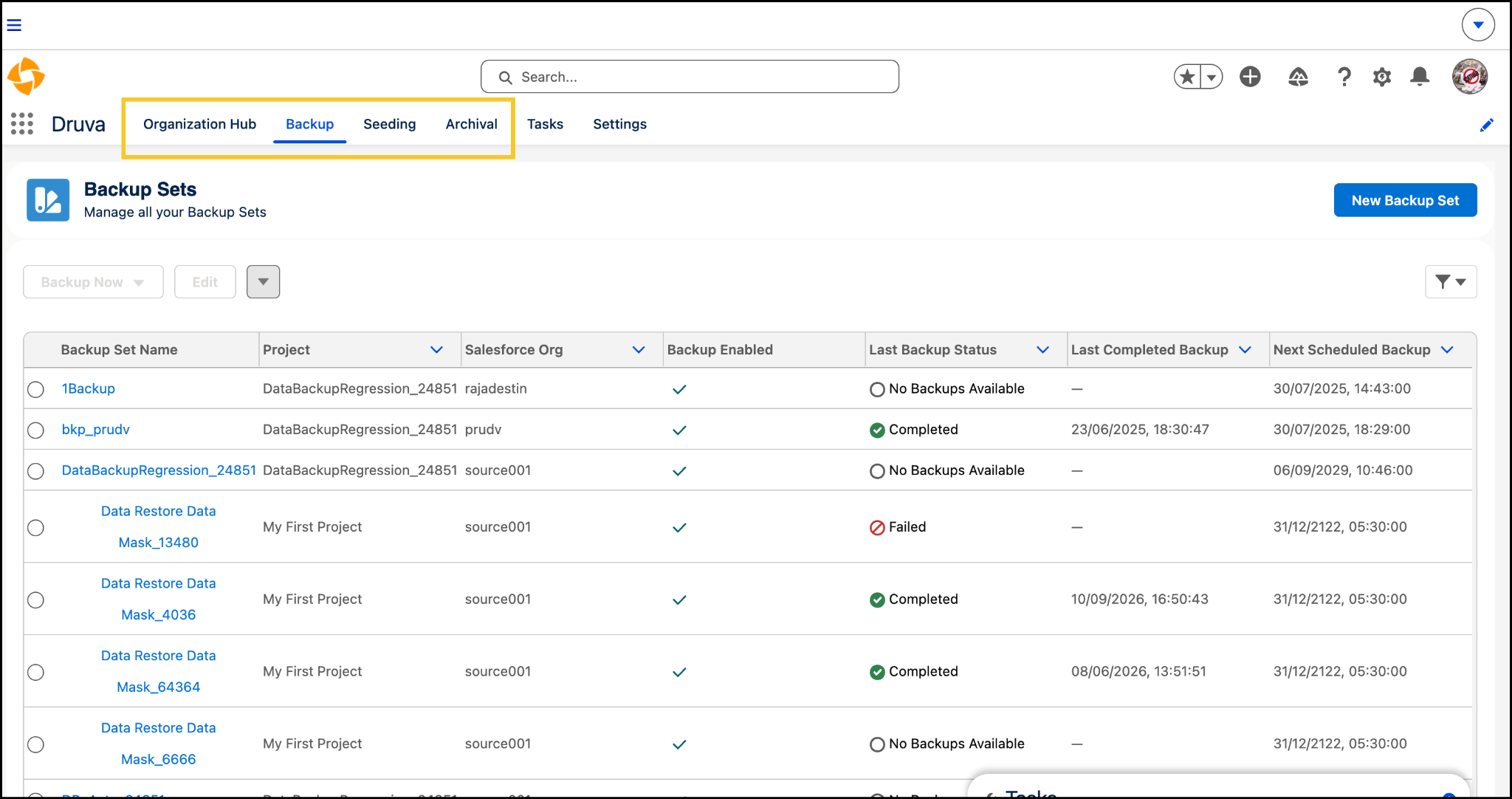
    On September 22, 2026, we shipped the biggest redesign of Druva’s Salesforce solution. This redesign was fundamentally based around one question: what does a Salesforce admin need in the first hour after something goes wrong? The result is a cleaner, faster restore experience that sits right inside Salesforce. Druva runs as a native app in your org and fully supports Lightning Experience, so admins can run backups, compare snapshots, and restore data without leaving Salesforce or learning a separate point tool. Navigation uses Salesforce’s own terms, guided wizards replace complex configuration, and recovery starts where you spot the problem.

    Under the hood, the foundation is the same one customers already rely on: 100% SaaS with no infrastructure to manage, automated daily backups of data and metadata, and an independent, air-gapped copy kept outside Salesforce and protected with envelope encryption. Here’s what’s new, from the day you connect your first org to the day you need Druva most: 

    Organization Hub: All your Salesforce orgs in one place

    Most teams don’t run one Salesforce org. They run a production instance, a handful of sandboxes, and maybe an org picked up in an acquisition. The new Organization Hub (formerly Environment Hub) brings all of them into one view, using the same terms Salesforce uses. Admins know where they are from the first click, and you can see your whole Salesforce estate at a glance.

    Org Hub

    Intelligent Auto-Discovery: Complete coverage with nothing missed

    Once an org is connected, Druva automatically discovers every object in it: standard, custom, and everything in between. It also maps parent-child relationships at every level. You don’t write scripts, maintain field lists, or find out later that a new custom object was never backed up.

    Streamlined Backup Sets: Protection in four simple steps

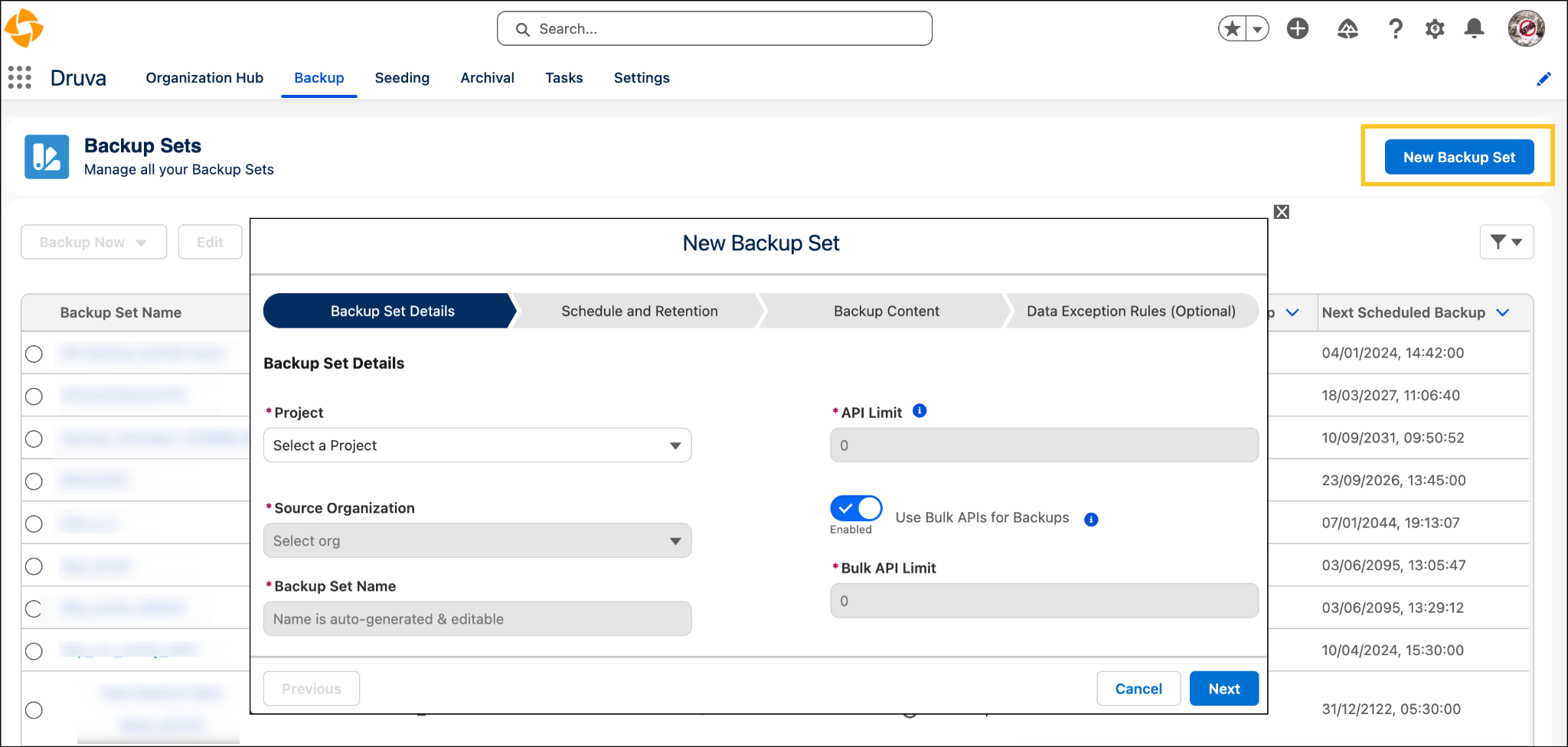
    Backup Sets replace Backup Definitions, and all of them now sit in one list under the Backup tab. A guided four-step wizard covers what an admin needs to decide:

    1. Backup Set Details: what you’re protecting and why
    2. Schedule and Retention: how often to back up and how long to keep it
    3. Backup Content: which objects and data to include
    4. Data Exception Rules: set alerts for data anomaly

    Answer those four, and you have complete, policy-driven protection in minutes. Because every Backup Set lives in one list, you always know what’s protected and how.

    backup sets

    One-Click Restore Access: Recover data where you already are

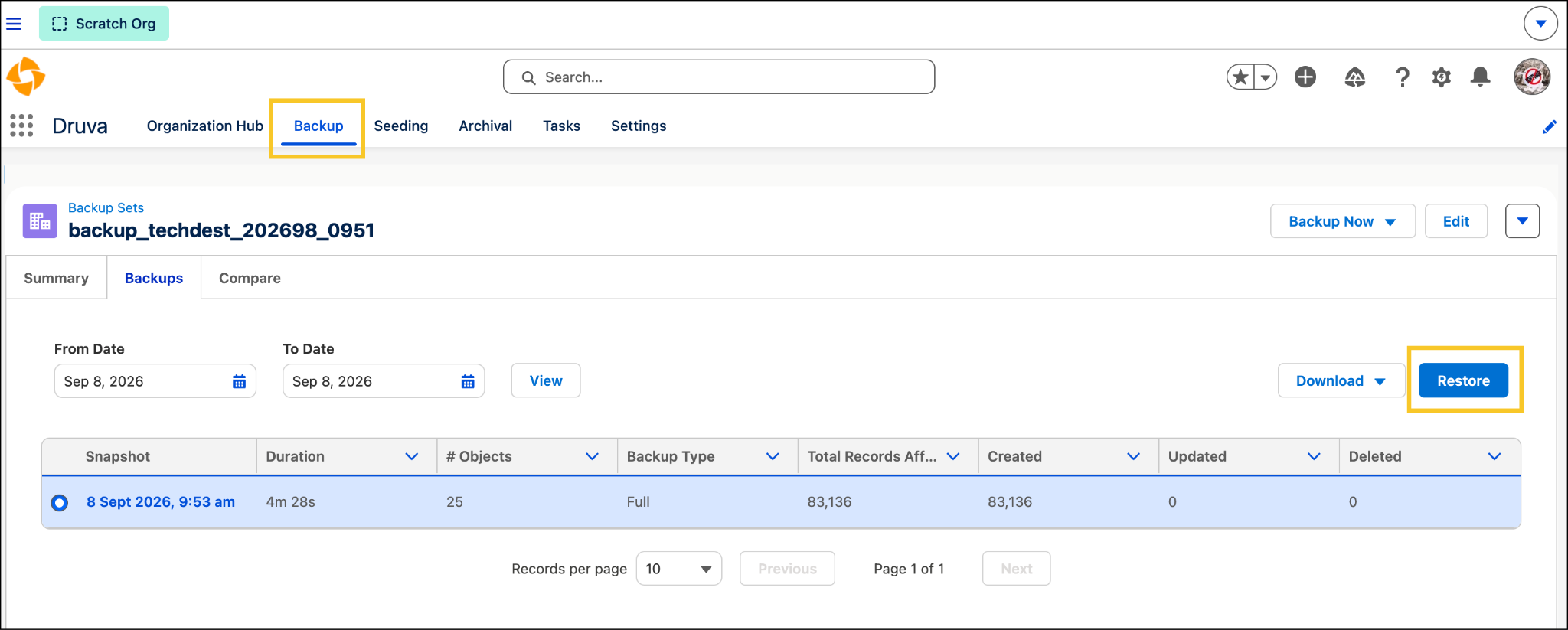
    It’s 9 a.m. and a sales manager reports that half her team’s Opportunities have the wrong close dates. With Druva, you start the restore right from the backup list or from the snapshot itself, wherever you spotted the problem.

    A guided three-step wizard takes it from there. For full-snapshot restores, every object is filled in for you. Recover a whole org, one object, a few records, or specific fields. Parent-child relationships stay intact, so nothing comes back orphaned and nothing gets duplicated. What used to take a week of spreadsheets and SOQL queries now takes a few minutes.

    restore

    Self-Service Restore for Archived Records: Empower users, keep control

    Archival moves inactive records into low-cost, air-gapped storage. Getting those records back used to mean filing an IT ticket. Now admins can invite business users into specific archival projects in the Druva app, and project-based access means they only see and restore what they’re allowed to. Sales ops gets its 2019 accounts back without a ticket, and IT keeps the guardrails.

    Focused Data Seeding: Better sandboxes, faster development

    Seeding (formerly Restore & Seeding) now has its own dedicated space, built for one job: filling sandboxes with relevant, realistic production data. Restore lives under Backup, and Seeding is just for your builders. Developers, testers, and the AI agents you’re validating get production-like environments with the right related records, without slowing down your release cycles.

    Advanced Reporting: Clear visibility you can trust

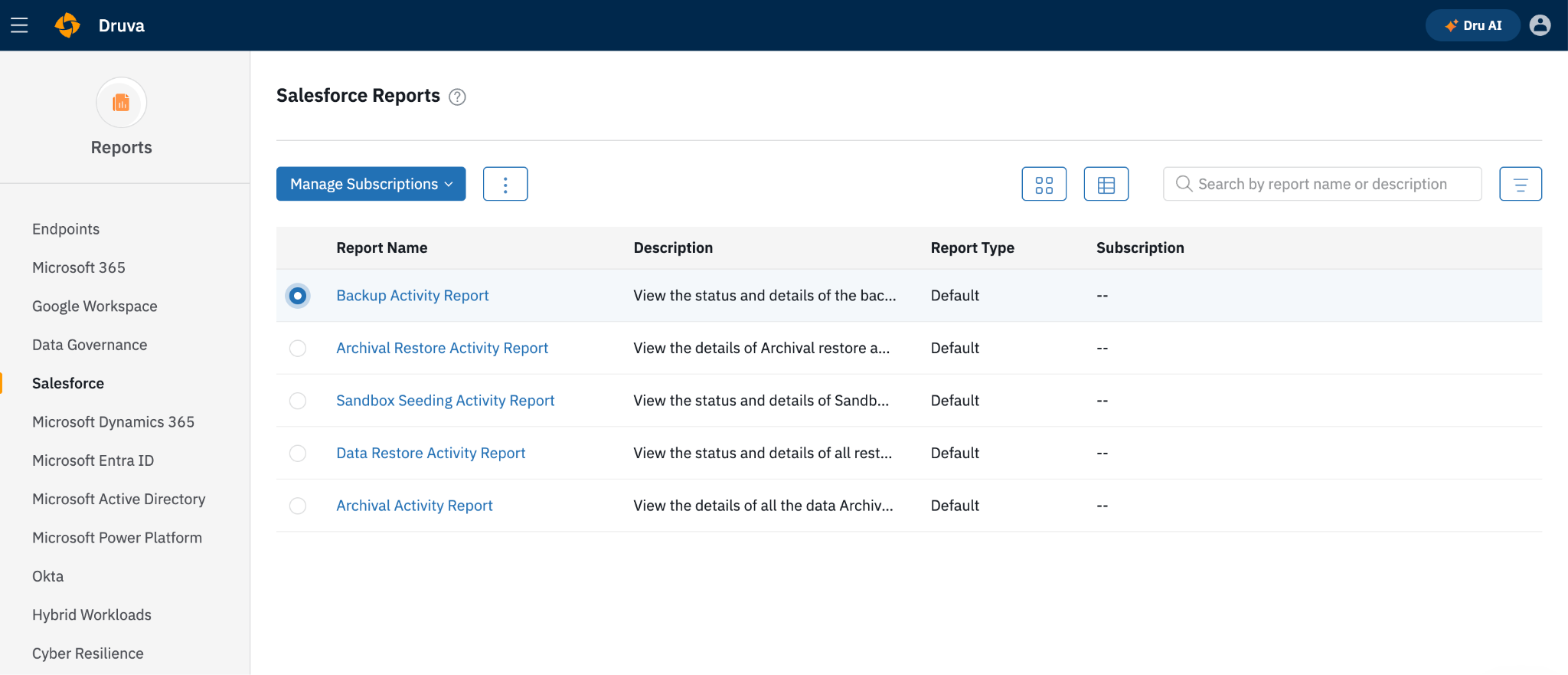
    Protection you can’t see is protection you can’t prove. The new unified reporting experience gives you more accurate, deeper insight into backup health and recovery activity. When an auditor, a compliance reviewer, or your CIO asks whether Salesforce data is protected, the answer is a report, not a guess.


    One-Click Restore Access

    More Than a New Look: What Admins Actually Gain

    A new interface is nice to have. What matters is what happens on the bad day, and on all the quiet days before it. The redesign changes four things for Salesforce teams.

    1. Recovery takes minutes, not a week.
    When bad data spreads through your org, every hour counts. Druva lets you restore to any point in time at the org, object, record, or field level. Compare snapshots to see exactly what changed, then restore only what’s wrong. Druva automatically keeps parent-child relationships intact at every level, and built-in external IDs prevent duplicates. Records come back connected and clean, with no scripts, manual mapping, or cleanup afterward.

    2. Nothing is left out.
    A backup is only as good as what it covers. Druva protects standard, custom, and managed-package objects, plus attachments, files, Knowledge, Chatter, and metadata. Auto-discovery finds new objects as your org changes, so a new custom object you added last quarter isn’t missing on the day you need it.

    3. Your recovery point stays safe from whatever hit your org.
    Mistakes, a compromised connected app, or a ransomware attack can all reach data inside Salesforce. Druva keeps your backups off-site and air-gapped from Salesforce, with envelope encryption in transit and at rest. That gives you a clean, independent copy that also supports data residency and cyber-recovery requirements.

    4. Costs go down instead of up.
    Druva covers the whole Salesforce data lifecycle (backup, recovery, archiving, and seeding) in one console, so you aren’t paying for and managing several point tools. Simple per-user pricing with unlimited storage means no capacity overages as your data grows. Archiving inactive records can cut Salesforce storage spend by up to 50%,* and automated sandbox seeding costs 10–20x less than full-copy sandboxes.*

    Recover With Confidence in the Agentic Era

    The oldest rule in backup still holds: keep a copy of your data somewhere separate from production. As AI agents, automations and integrations take on more of the work inside Salesforce, that rule matters more, not less. A person makes mistakes with a few records at a time. An agent with the wrong instructions makes them at machine speed.

    Druva keeps your recovery copy independent of Salesforce, air-gapped and managed from the same platform many teams already trust for Microsoft 365, Google Workspace, Entra ID and endpoints, the platform Gartner named a Leader in its 2026 Magic Quadrant for Backup and Data Protection Platforms. Before your next big data load, deployment, or agent launch, take a snapshot. Then you'll always have a way back.

    Salesforce still has no undo button. Now you have one with Druva.

    Check the product tour to see the new Druva Salesforce solution in action, or you can start your 30-day free trial today.


    FAQs

    Q: What is Druva for Salesforce?

    A: Druva for Salesforce is a fully managed SaaS backup, recovery, and data management service for Salesforce. It automatically backs up data and metadata, including standard, custom, and managed package objects, files, Knowledge, and Chatter, into air-gapped storage outside your org. From one console, admins can restore anything from an entire org down to a single field, seed sandboxes with realistic test data and archive inactive records to cut costs, with no infrastructure to manage.

    Q: How do I restore deleted or corrupted Salesforce records without restoring the whole org?

    A: With Druva, open the Backup Set for the affected org, use record change counts and Compare to find the last clean snapshot, then start a restore from that snapshot and follow the 3-step wizard. You can restore specific objects, records or fields, and parent-child relationships are preserved.

    Q: Does Salesforce back up my data automatically?

    A: Salesforce offers a weekly or monthly Data Export service, but a CSV export is not a recovery plan. Restoring from it means rebuilding relationships and metadata by hand. An independent service like Druva automates daily backups and restores data and metadata at the org, object, record or field level.

    Q: How do I roll back Salesforce changes made by Agentforce or a bad automation?

    A: Take a snapshot before any agent, flow or integration goes live. If it changes data unexpectedly, record change counts in Druva flag the spike, snapshot compare feature shows exactly which records and fields changed, and a 3-step restore rolls back only the affected data.

    Q: How is Druva for Salesforce priced?

    A: Druva for Salesforce is licensed per user, with unlimited backup storage for each user, so your cost does not rise with data volume. Core recovery capabilities, including data and metadata backup, point-in-time restore, snapshot Compare, air-gapped storage and encryption, are included in the backup license rather than sold as add-ons.

    Q: How is Druva for Salesforce different from Salesforce Backup & Recover (formerly Own)?

    A: Druva is an independent vendor, so your Salesforce backups are kept in air-gapped storage outside Salesforce rather than with the same company that runs production. Druva is licensed per user with unlimited backup storage, includes core recovery features in the backup license, and protects Salesforce from the same platform as Microsoft 365, Google Workspace, identity and endpoints.

    Q: I already use Druva for Microsoft 365. Can I add Salesforce?

    A: Yes. Druva for Salesforce runs on the same Druva platform, so you manage it from the console you already use, with the same sign-in and centralized reporting. Your account team can add Salesforce to your existing Druva subscription. Druva also offers a SaaS Universal License, one license to protect all your SaaS apps and identity workloads.  

    Further Reading