Backing up large, mission-critical Oracle databases in a Direct-to-Cloud (DTC) environment comes with unique challenges. Network fluctuations, maintenance windows, or transient system issues can interrupt long-running full backup jobs. Since a full backup forms the basis of a new backup chain, a failed full backup also leads to interruption of periodic Archivelog backups, leaving the database exposed until a successful backup.
Historically, a failed full backup meant one thing: starting over. For multi-terabyte databases, this didn't just mean lost time—it meant extended backup windows, increased resource consumption on production servers, and potential risks to Recovery Point Objectives (RPO).
We are excited to announce a significant enhancement to our Oracle DTC solution: Resume Capability for Full Backups. This feature allows the Druva agent to intelligently pick up where it left off, ensuring a resilient data protection strategy.
The Challenge: The "All-or-Nothing" Approach
In a standard Oracle RMAN workflow, a backup job is often treated as an atomic unit. If you are backing up a 50TB database and the connection drops at 49TB, the entire job is marked as failed. The backup pieces created up to that point are typically discarded or ignored, and the next attempt starts from zero.
This approach creates a Cascading Failure Effect:
- Window Overruns: Re-running a full backup consumes the window meant for incremental backups.
- Storage Bloat: Without careful management, failed attempts leave behind "orphan" data on storage.
- RPO Gaps: While the full backup is retrying, archive logs may not be backed up, widening the exposure window.
The Solution: Intelligent Resume
To address this problem, we integrated Oracle Recovery Manager's (RMAN) native capabilities with Druva's orchestration layer. The primary objective was to optimize data transfer by preventing the re-upload of data that had already been successfully backed up.
How It Works: A High-Level View
The resume workflow is built on three key pillars: Intelligent State Detection, Precision Cleanup, and Logical Continuity.
1. Intelligent State Detection & Validation
Before a backup starts, the Druva agent analyzes the metadata of the previous failed attempt. It asks the following critical questions:
- Was the last failure a Full Backup?
- Do we have a valid chain of archive logs since that failure?
The log chain validation is a crucial safety step. Resuming a backup is only safe if the database can be recovered to a consistent point in time. Our agent queries native views (like v$archived_log) to ensure no logs are missing between the failed attempt and now. If the chain is broken, we fall back to a fresh full backup to guarantee data integrity.
2. Utilizing Native RMAN Capabilities
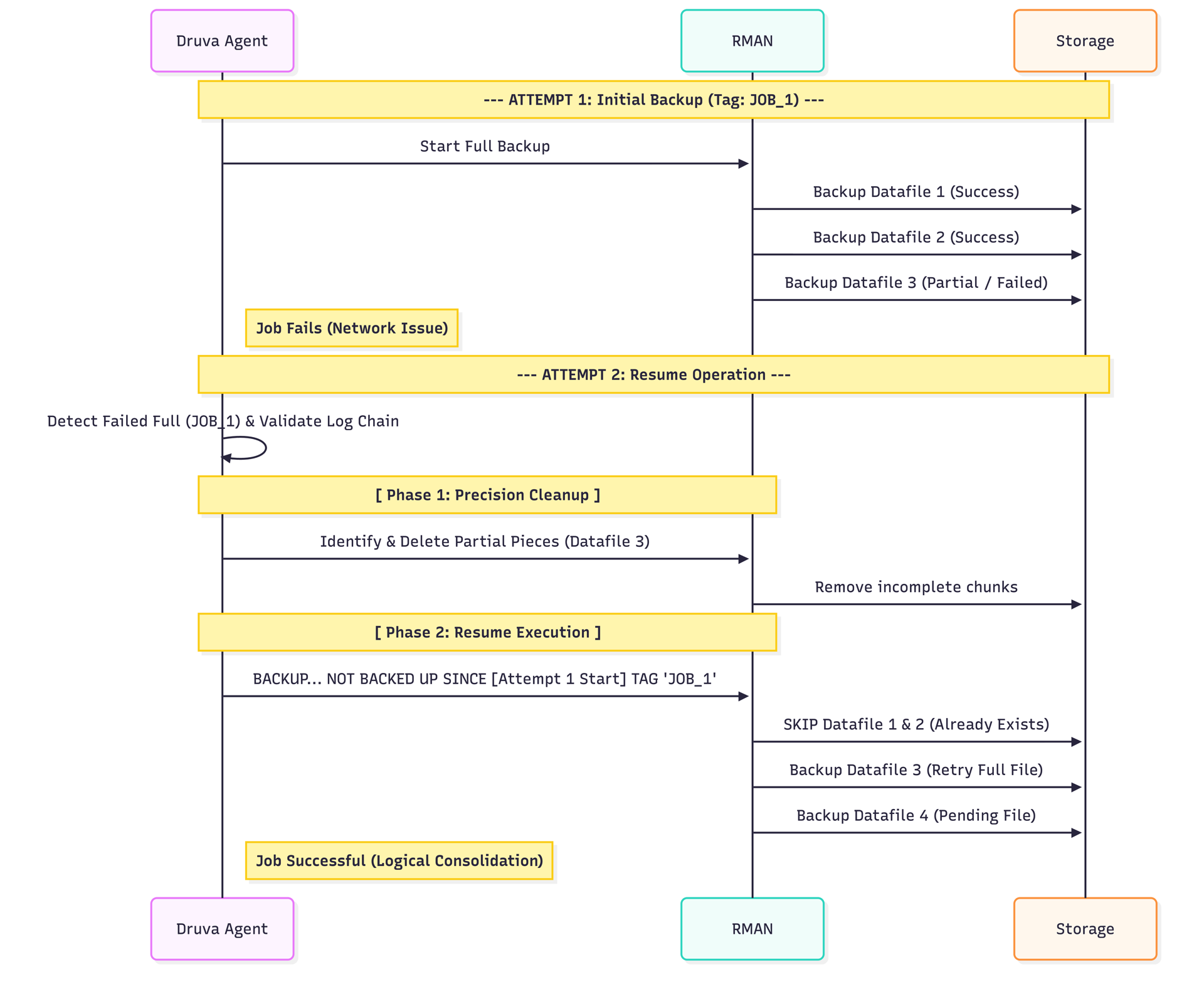
We utilize RMAN's NOT BACKED UP SINCE TIME ... clause in the BACKUP command. When a resume is triggered, the agent calculates the precise start time of the original failed job.
This command instructs RMAN to:
"Backup the database, but skip any file that has already been successfully backed up since [Original Job Start Time]."
This ensures that Datafile 1, which finished successfully yesterday, is skipped today, while Datafile 2, which was pending, gets backed up.
3. Logical Continuity: The "Single Job" Illusion
One of the key aspects of this design is how it handles Backup Tags and Command IDs. To Oracle and to the Druva Cloud Platform, the resumed session doesn't look like a disparate set of files.
- We reuse the Tag and Command ID from the failed job.
- Without Resume: Job A fails (Tag JOB_A). Job B starts (Tag JOB_B). Result: Fragmented backups.
- With Resume: Job A fails (Tag JOB_A). Job B "Resumes" (Reuses Tag JOB_A).
The Result: When you list your backups or perform a restore, you see a single, consolidated entry. All the pieces—whether they were uploaded on Monday (attempt 1) or Tuesday (attempt 2)—are logically grouped together. This idea extends to multiple potential failed jobs as well.
The agent also reuses the Command ID associated with the RMAN backup session. This allows the agent to gather backup file information (v$backup_piece_details view) and stats data (v$rman_status view) across all failed jobs and form consolidated Metadata for the backup.
Handling Complexity: Multi-Section Backups
Large Oracle datafiles are often split into multiple "sections" to back them up in parallel. This introduces a complexity: What if 8 out of 10 sections of a massive datafile were uploaded when the network failed?
RMAN considers a file "backed up" only when all sections are complete. If we simply resumed, RMAN would see that file as incomplete and re-send all 10 sections, leaving the original 8 "orphan" sections consuming storage.
Our Approach: Precision Cleanup
Before the resume command runs, the Druva agent performs a surgical cleanup:
- It identifies datafiles with partial section completion (e.g., 8/10 sections done).
- It explicitly deletes those 8 incomplete sections from the catalog and storage.
- It leaves the fully completed files untouched.
This ensures your storage footprint remains efficient, with no "ghost" data lingering from failed runs.
Visualizing the Workflow
Scenario: A Full Backup of 4 Datafiles runs. Connection fails after Datafiles 1 & 2 complete, and Datafile 3 is halfway done.