Salesforce, a global leader in cloud-based CRM and ERP solutions, is widely used by organizations of all sizes, from multinational enterprises to small businesses. This widespread adoption makes the data stored within Salesforce a valuable asset—a "gold mine" for cyber attackers.
Recognizing this vulnerability, Salesforce strongly emphasizes that "Cybersecurity is a shared responsibility." This principle highlights the need for both the platform provider and its users to actively collaborate in maintaining a secure environment.
The importance of this shared responsibility is further underscored by Salesforce's recent history, which has seen the platform exposed to several cyberattacks. These incidents serve as stark reminders that even sophisticated cloud platforms are not immune to the evolving threat landscape, and highlight the continuous need for robust security measures and vigilance from all stakeholders.
Hanna Andersson Data Breach: In 2019, a malware infection on Hanna Andersson's Salesforce platform compromised over 200,000 customer accounts, including sensitive data like names, payment information, and addresses.
Social Engineering Attacks: A threat group, UNC6040, has targeted Salesforce instances by impersonating IT workers and tricking employees into sharing credentials through voice phishing, a type of social engineering attack.
Snowflake Breach: While not a direct Salesforce breach, the Snowflake incident in 2024 highlighted the risk of stolen credentials. Hackers exploited compromised credentials to access customer accounts, demonstrating the potential impact of compromised credentials on Salesforce environments.
Credential Stuffing: Attackers use stolen login credentials, often obtained from previous data breaches, to gain unauthorized access to Salesforce accounts.
Malware Infections: Malware can be introduced to Salesforce instances through various means, including infected files or websites, potentially leading to data exfiltration or system compromise.
Detect, Protect, Recover: Enhancing Salesforce Security
Backing up Salesforce data with a reliable Salesforce backup solution is essential for maintaining business continuity, data integrity, and regulatory compliance. Data loss from accidental deletions, integration errors, malicious activity, or misconfigured workflows can severely disrupt operations and impact revenue.
A comprehensive Salesforce backup solution enables fast, reliable recovery—but backup alone isn’t enough.
Backups are essential for compliance and data recovery, but without continuous security monitoring, they risk storing compromised or suspicious data over time, ultimately undermining their effectiveness.
For instance, if large-scale unauthorized changes go unnoticed for months, restoring from those backups could simply reintroduce the corrupted data. To ensure recovery is both reliable and timely, it’s vital to combine robust backup strategies with intelligent anomaly detection. This pairing safeguards data integrity and ensures backups remain a trustworthy safety net when they’re needed most.
Common cyber threats to Salesforce data include compromised credentials, phishing, insider threats, session hijacking, token theft, API abuse, and insufficient visibility and monitoring.
This blog explores the vital importance of data visibility and proactive monitoring in mitigating threats and enhancing Salesforce security.
Why Salesforce Needs Proactive Monitoring
In today’s threat landscape, SaaS data demands continuous vigilance against cyberattacks and ransomware. Even seemingly minor oversights — like a delayed account deactivation or an insider modifying records — can lead to major disruptions. Once a malicious actor gains access, data can be silently manipulated, often unnoticed until an end user reports it, or a digital audit flags inconsistencies.
With Druva Data Protection for Salesforce, you gain advanced threat detection capabilities that help you stay informed about the security status of your production org in real time.
Smart Alerting with Druva
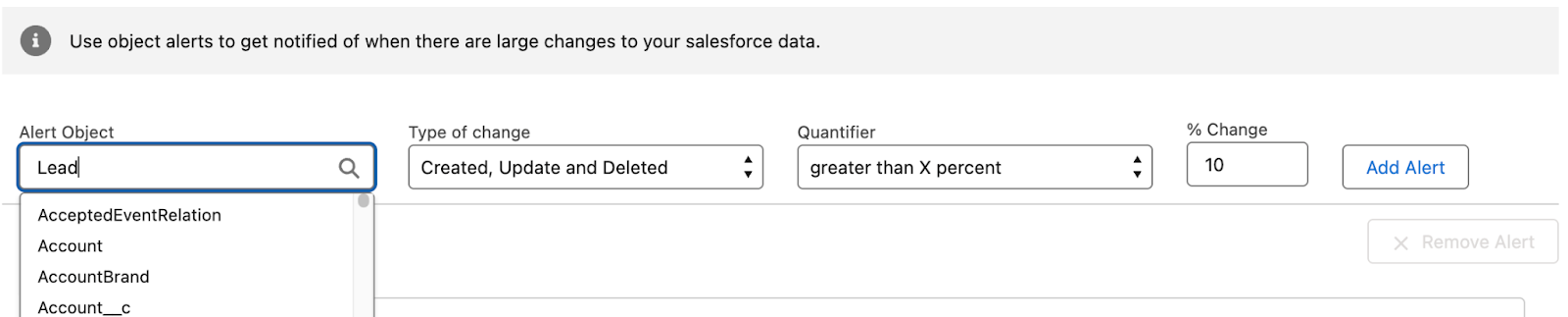
Druva’s Salesforce backup solution includes smart alerting features that detect and notify administrators of large-scale or unusual data changes. These alerts are especially valuable when critical record changes go unnoticed.
Example: If the email or contact data of potential leads is altered, teams might not realize until email campaigns start bouncing — by then, the damage is already done.
Druva enables you to configure alerts for specific objects and set thresholds for unusual activity.
How to Set Up Smart Alerts in Druva
Login to the Druva Salesforce application.
Navigate to the “Data Backup” tab.
Select an existing backup definition and click “Edit” or click “New” to create one.
Go to the “Alerts” section.
Search for the object you want to monitor.
Define alert conditions (e.g., trigger an alert if the Lead object sees a 10% or higher change in record count).