


Your Identity Was Compromised. Now What?

Ravindra Deotare, Principal Product Manager

October 19, 2026

Your Identity Was Compromised. Now What?

Content

    It's 2:30 a.m., and your security tool has flagged a suspicious admin account. Someone has been using it, and it wasn't the admin.

    You've found the compromised identity. Now the harder questions start:

    • What did the attacker create, change, or delete with it?

    • Which permissions, roles, and group memberships did those changes touch?

    • Did they plant a backdoor that will let them back in next week?

    • If you roll things back, how do you avoid restoring the attacker's changes or breaking something the business depends on?

    Most teams I talk to have a good answer to "Which identity is compromised?" and a much weaker answer to "What do we do about it?"

    That's the gap we're closing.

    Today, I'm excited to announce the general availability of Identity Behavioral Insights and Guided Recovery for Active Directory, Microsoft Entra ID, and Okta.

    Why attackers go after identity

    Identity has become the front door for attackers. When an adversary logs in with a compromised credential, they inherit its permissions and gain valid access to critical systems. From there, they can quietly escalate privileges, modify configurations, establish persistence, and move laterally. Each step widens the blast radius, and much of it goes unnoticed. When it's time to respond, and ultimately recover, businesses face an uphill battle:

    1. Nobody can see the blast radius

    Teams can't quickly tell what a compromised identity touched, or how those changes rippled across other identities, permissions, and resources. Investigators end up rebuilding the timeline by hand, and malicious changes slip through.

    2. Investigation is slow, manual, and tedious

    Activity data is fragmented and sometimes missing critical context, forcing analysts to correlate it across multiple records and systems. Every hour spent doing that is another hour the attacker keeps access or operations stay down, and an hour your SOC and IT teams aren't spending on response.

    3. Response depends on who's on shift

    Even after you've pieced together what happened, someone has to decide which objects to restore and which changes to reverse. Without a defined workflow, two analysts can handle the same incident in two entirely different ways. Steps get skipped, outcomes vary, and legitimate business operations can be disrupted.

    4. Recovery remains a guessing game

    Restoring an object doesn't make the environment clean, especially without precise evidence of what's risky and what's safe. The environment can only be trusted once malicious permissions, access paths, and persistence are removed. Fail to re-establish that trust, and reinfection follows.

    Our answer to these challenges was to go a level deeper, applying insights and evidence to guide decision-making and re-establish trustworthy access faster.

    How Druva helps

    Druva Identity Resilience gives IT and SecOps teams an identity-aware view across Active Directory, Microsoft Entra ID, and Okta. It's powered by Dru MetaGraph, our AI-driven relationship graph, which continuously correlates identity metadata so teams can understand the full blast radius of a compromise in minutes instead of spending days digging through logs.

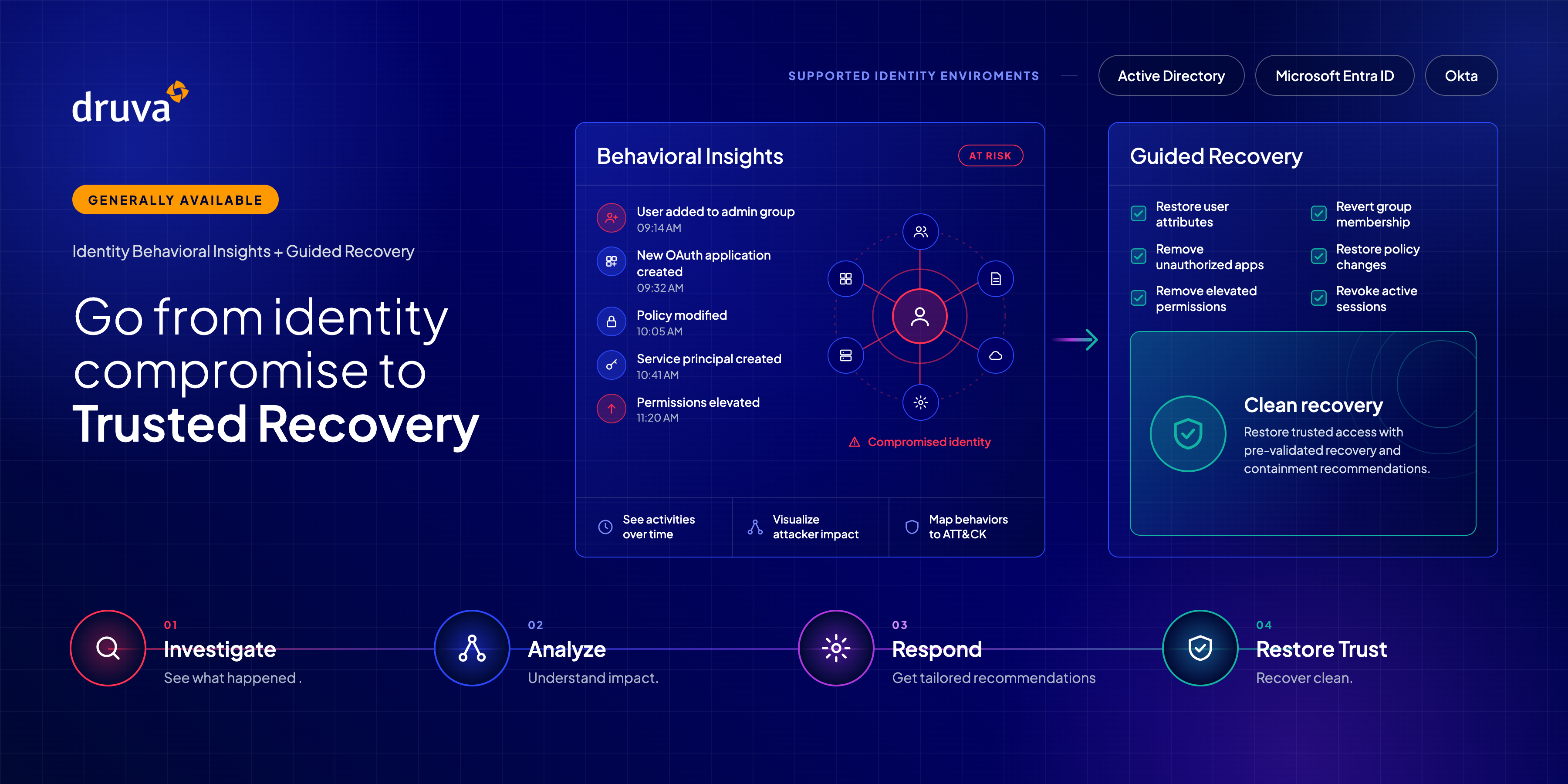
    Behavioral Insights reveals impact, how far an attacker reached, and what they changed. Guided Recovery then turns that evidence into a pre-validated plan to contain the threat and restore identities to a known-good state. 

    Continue reading to learn more, and watch this demo to see it in action.
    The result: faster investigations, no lingering persistence, and the confidence of returning to a verifiably clean, trustworthy identity environment.

    Identity Behavioral Insights: Understand malicious activity and its impact

    Start with the question every responder asks first: What did the compromised identity do?

    How it works

    Behavioral Insights delivers deep behavioral and impact analysis across your Active Directory, Entra ID, and Okta environments, putting activity in context and illuminating risk and blast radius.

    • Search an identity. Investigate any human or non-human identity (NHI), set a date range, and get a consolidated timeline and table view of its activity and configuration changes.
    • See the objects it changed. Quickly examine what the identity created, modified, or deleted during the window you care about.
    • Understand the blast radius. A single change rarely tells the whole story. Behavioral Insights visualizes propagated impacts and affected relationships, so you can see the broader implications of the compromise.
    • Know what to look at first. Changes are tagged with MITRE ATT&CK mappings, privilege escalation indicators, persistence-related activity, and other risk signals. A privilege escalation stands out from a routine attribute change, so your team works through the suspicious changes before the noise instead of treating every event as equal.

    Guided Recovery: Make evidence-based recovery decisions

    Investigation answers what happened. The next question is harder: What should we recover, and how?

    How it works

    Guided Recovery turns the findings from your investigation into a recovery workflow, backed by evidence and built to get you back to a trustworthy state.

    • Get recommendations. Using the changes surfaced by Behavioral Insights, Guided Recovery recommends which affected objects and configurations need attention.
    • Contain and recover. Together, containment and recovery recommendations give you a pre-validated plan back to a known, clean state. Containment recommendations guide the actions to take outside the Druva platform to prevent further unauthorized access or damage, such as invalidating active tokens, revoking open sessions, and rotating administrative secrets. Recovery recommendations provide a detailed plan inside Druva to recover objects at a granular level, then execute the restore to reinstate a trusted identity.
    • Recover at the right scale. Some incidents call for running the full recommended plan. Others need a lighter touch. You have full flexibility to restore individual object attributes, roles, permissions, policies, and access configurations, or entire environments. That means IT teams can reverse the attacker's changes without rolling back the legitimate work that happened in the same window.

    Two capabilities, one workflow

    Identity Behavioral Insights tells you what happened and what was affected. Guided Recovery tells you what to recover and how. Because investigation findings carry straight into recovery and remediation, the two work as a single workflow with a clear path back to an identity environment you can trust.

    Together, they help you:

    • Accelerate impact analysis with consolidated visibility into activities, affected objects, and relationships.
    • Reduce manual investigation effort with a chronological, contextualized view of identity changes.
    • Improve recovery consistency from one incident and one analyst to the next, through curated recommendations and full-plan or selective recovery.
    • Minimize business disruption by recovering at the object level, so the business keeps running while you clean up.
    • Work toward a trusted identity state by connecting investigation findings with recovery and remediation requirements.

    Get started

    Detecting a compromised identity is only the beginning. Restoring trust means understanding its impact and taking the right recovery actions.

    Identity Behavioral Insights and Guided Recovery are generally available today for Active Directory, Microsoft Entra ID, and Okta. Take a tour of the feature here, reach out to your Druva representative, or visit our Identity Resilience page to see them in action.

    Further Reading