It’s hard to support end-users at the best of times, and even more onerous when the IT staffers are at a distance from the people they aim to serve. But the frustrations are even worse when it comes to ensuring that users in remote offices have their data backed up. Because, all too often, they don’t. And when the systems inevitably fail, that costs the business money.
Backing up systems remotely is not a pleasant task for server administrators. It’s worse for anybody else – such as the employees at your company who work in external offices, for whom “making the computer work” is not their primary job. With insufficient IT skills at remote locations, and with complicated, error-prone, multi-step processes in place, stories abound of missing or empty tapes, failed backups, and failed restores (including one at Pixar that almost wiped out Toy Story 2).
Yet, ultimately, ensuring that systems are backed up (and restored!) is part of the admin’s job.
Unfortunately, the problem is only going to get worse for server admins. Among the reasons are increases in server data workload sizes; there’s also increased retention requirements, a result of compliance and regulatory changes.
Underpinning this complexity is the tremendous cost of remote office backup.
“High Costs? Really? But tape is cheap!” is the response of some server admins.
But tape costs are just one tiny part of the expenditures. Let’s explore the true cost of remote office backup.
Multi-tier Remote Office Backup Solutions
The datacenter is the first to experience the benefits of newer IT technologies, such as virtualization, unified storage, and software-defined networking (SDN). But typically, remote offices are stuck in the past, having to trundle along with older equipment that is expected to just keep working… forever. Nowhere is this problem more apparent – and expensive – than server backup.
Backup processes that were set up in the past – sometimes a decade ago – have not been changed. While personnel have moved on, the processes have not. It is not uncommon for new server admins to profess complete ignorance of the backup processes they inherited, often for good reason. They worry if, when the day comes, a restore will actually succeed.
In a typical branch office, a handful of servers (perhaps three to five servers) run the local office’s workloads (file servers, database servers, etc.) that are important enough to backup and archive for the long term. Each of these servers have a backup agent that targets a local backup server. The backup server then writes to a local tape drive or to secondary disk storage.
The usual backup policy for these workloads is to do weekly full backups and daily incremental backups. Thirty days of backups are stored locally (either on tape or on disk) to enable quick restores. After 30 days, the tapes are sent offsite for long-term retention. With current compliance and regulation requirements, it is common to see long term archival of 7 years or more.
When a hard disk is used as secondary storage for backup, this introduces an extra step: The data has to be seeded to tape before offsite vaulting.
The Data Storage Explosion
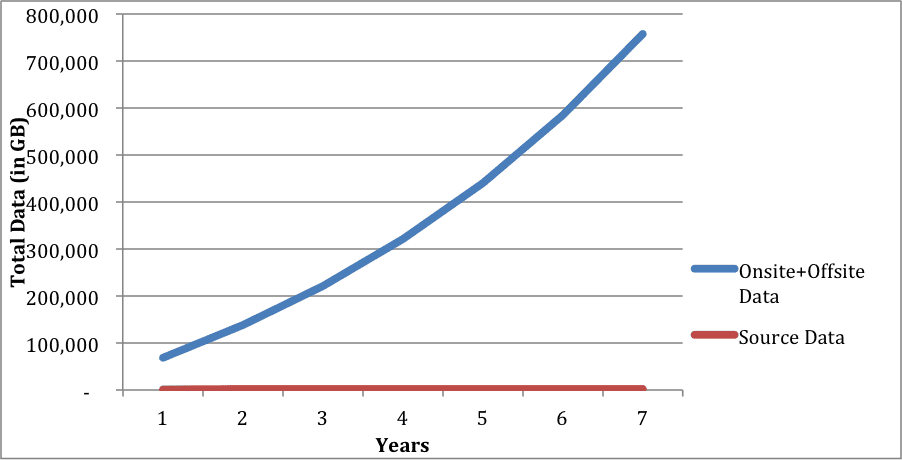
Assume a corporate branch office that has 1TB of data that needs to be backed up. Also assume a 1% daily change rate and a 20% increase in source data per year. Given the typical backup scenario described above, 1TB of source data generates a significant amount of target data; that includes both maintained onsite data and data sent offsite to the vault.
By the end of year 1, that 1TB of data has generated 13TB of onsite data and 56TB of offsite data. By the end of Year 7, more than 700TB of data is being managed offsite!